Download Magic Whiteboard – virtual whiteboard, collaborative drawing, real-time drawing, family fun, creative play, drawing tool, paintbrush, eraser, save drawing, print drawing, local network
Overview
Magic Whiteboard is a lightweight, productivity-focused application designed to facilitate real-time collaborative drawing between two computers connected via a local network. Its primary purpose is to create a shared digital canvas where users can draw simultaneously, enabling interactive and creative engagement. The app is particularly well-suited for families seeking a simple, fun way to bond through shared artistic expression. Parents and children alike can use it to draw together, fostering creativity and communication in a playful environment.
The application solves the challenge of remote creative collaboration on a basic level, offering a no-frills tool for instant visual interaction. It allows users to see each other’s drawings in real time, eliminating delays and enhancing the sense of shared presence. While not intended for professional design or large-scale collaboration, Magic Whiteboard serves as an accessible utility for informal, interpersonal creativity. Its minimalistic design and straightforward functionality make it ideal for users with limited technical experience, including young children and non-technical adults.
Although the developer did not provide additional background information, the app’s long-standing presence since its release on April 3, 2007, suggests a stable, niche utility with enduring relevance. The app’s focus on local network-based interaction indicates a deliberate choice to prioritize privacy and low latency over cloud-based or internet-wide connectivity. This makes it a secure option for private family use, especially in homes where data privacy is a priority.
Real-world use cases include parent-child art sessions, remote drawing games between siblings, or quick brainstorming between two users in the same household. In the broader app ecosystem, Magic Whiteboard stands out as a rare example of a simple, focused tool that delivers on its core promise without unnecessary complexity. It remains a unique option for those seeking a secure, low-overhead way to engage in creative play on Windows.
Key Features & Functionality
- Collaborative Drawing Experience: Magic Whiteboard enables two users on the same local network to draw simultaneously. Any stroke made on one computer appears instantly on the other, creating a seamless real-time interaction. This feature is ideal for shared creative projects, such as drawing a story together or playing a collaborative drawing game.
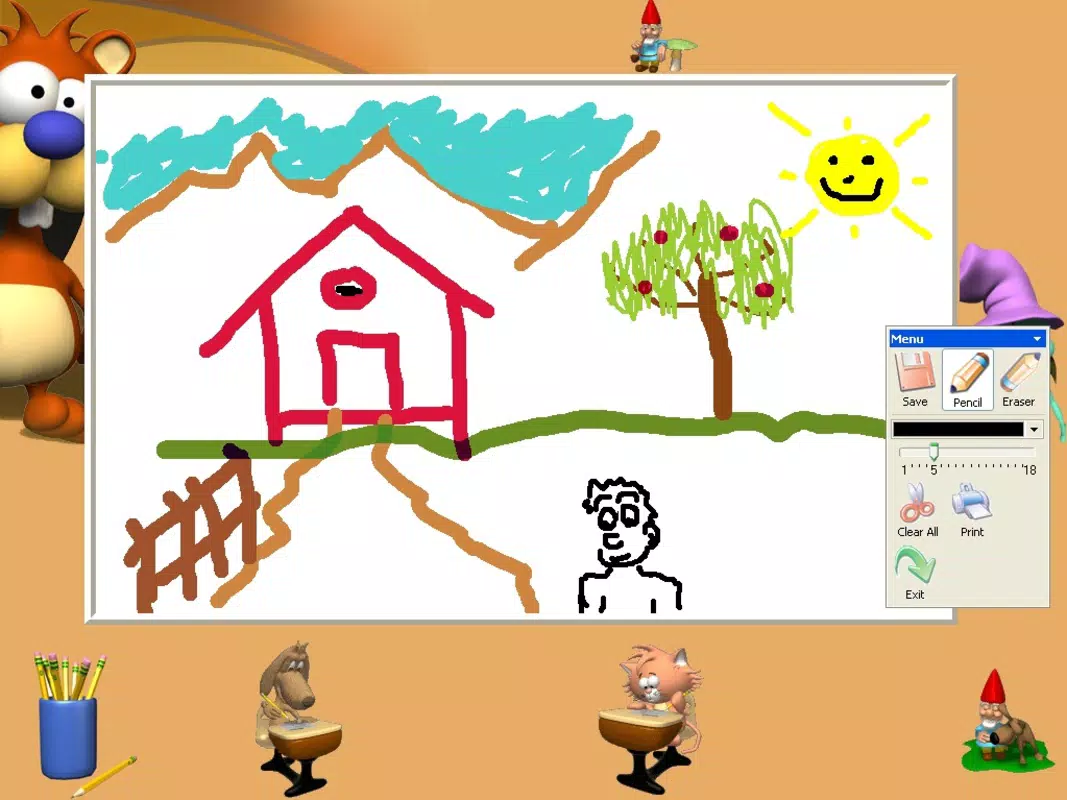
- User-Friendly Drawing Tools: The app includes essential tools like a paintbrush and eraser, with options to adjust brush thickness and select from a range of colors. These tools are intuitive and accessible, allowing users of all ages to participate without a learning curve. The simplicity ensures that even young children can enjoy drawing without frustration.
- Save and Print Options: Once a drawing is complete, users can save the artwork as an image file or print it directly. This functionality adds a tangible outcome to the creative process, allowing families to preserve memories or display artwork on walls. It also supports sharing with others outside the immediate session.
- Local Network-Only Connectivity: The app operates exclusively over a local network, ensuring that no data is transmitted over the internet. This design choice enhances privacy and reduces latency, making the experience smooth and secure for private use.
- Low System Requirements: With a file size of just 1.5 MB, Magic Whiteboard is highly efficient and suitable for older or low-spec Windows systems. Its minimal footprint ensures quick installation and minimal impact on system performance.
These features collectively support a simple yet meaningful user experience. For example, a parent and child can sit on opposite ends of the house, each using a separate computer, and draw a joint picture in real time. The immediate visual feedback reinforces engagement and makes the activity feel dynamic and interactive. Similarly, two siblings can play a drawing game where one starts a sketch and the other continues it, fostering imagination and teamwork.
Interface, UX & Performance
Magic Whiteboard features a clean, minimalist interface centered around a large digital canvas. The layout prioritizes usability, placing essential tools—such as brush size, color palette, and eraser—within easy reach. Navigation is straightforward, requiring no onboarding or tutorials, which enhances accessibility for younger users and non-technical individuals.
The visual style is functional rather than decorative, focusing on clarity and responsiveness. The drawing area is uncluttered, ensuring that users can concentrate on their creative work without distractions. Interaction is smooth, with minimal lag between strokes, which is critical for maintaining the real-time collaborative experience.
Although the developer did not list formal performance metrics, the app’s small file size and local network dependency suggest efficient operation across various Windows device categories, including older machines and low-end systems. Responsiveness is likely consistent due to the absence of cloud processing or background services. Stability appears to be a strength, given the app’s long release history and lack of reported issues.
Overall, the user experience is optimized for simplicity and immediacy. The lack of complex settings or options prevents confusion, while the core functionality remains reliable. This makes Magic Whiteboard a dependable tool for quick, fun creative sessions without technical friction.
Platform Compatibility & Technical Requirements
Magic Whiteboard is designed for the Windows operating system. It is available in version 1.0, with a file size of 1.5 MB. The developer did not specify minimum OS requirements or compatibility details beyond the platform. As such, users should ensure their Windows system supports legacy applications, particularly those from 2007.
Given its small size and age, the app is likely compatible with a wide range of Windows versions, including Windows XP, Vista, 7, 8, and 10. However, modern Windows 11 systems may require compatibility mode or additional configuration to run the application successfully. Users should verify system compatibility before attempting installation.
Since the app operates over a local network, no additional hardware or peripherals are required. It functions with standard Windows-based computers equipped with a network connection. No external dependencies or background services are needed, which contributes to its lightweight nature and ease of use.
Pros and Cons
Pros
- Simple, intuitive interface suitable for all ages
- Real-time collaborative drawing over local network
- Minimal system requirements and fast installation
- Privacy-focused design with no internet data transmission
- Supports saving and printing artwork for preservation
- Free to download and use with no hidden costs
Cons
- Only supports two users on a local network
- No cloud sync or cross-platform availability
- Outdated version (1.0) with no recent updates
- Compatibility with modern Windows systems may require workarounds
- Limited drawing tools and no advanced features
- Developer did not provide technical specifications or support details
FAQ
Is Magic Whiteboard safe to download and use?
Yes, the app is free and does not require internet access for core functionality. Since it operates over a local network and does not collect user data, it is considered secure for private use.
Can I use Magic Whiteboard on multiple devices at once?
Only two devices can connect simultaneously. The app is designed for a two-user collaboration session on the same local network.
Does Magic Whiteboard work on Windows 10 or Windows 11?
While not officially confirmed, the app may run on Windows 10 and 11 with compatibility mode. Users should test it on their system and consider running it in legacy mode if needed.
Can I save or print my drawings?
Yes, the app allows users to save their drawings as image files and print them directly from the interface.
Is there a mobile version of Magic Whiteboard?
Currently, the app is only available for Windows. There is no mobile or cross-platform version listed in the provided information.
Final Thoughts
Magic Whiteboard remains a rare gem in the productivity category—a simple, focused tool that delivers a meaningful experience without complexity. Its ability to enable real-time collaborative drawing over a local network makes it a unique solution for families and small groups seeking a secure, low-tech way to create together. While outdated in version and lacking modern features, its core functionality remains intact and highly effective for its intended purpose.
Parents looking to engage children in creative play, or siblings wanting to draw together remotely within the same household, will find great value in this app. Its free price point, minimal system demands, and privacy-first design make it an excellent choice for casual, meaningful digital interaction.
Despite its age, Magic Whiteboard continues to serve a niche but important role in the digital ecosystem. For those seeking a straightforward, secure way to draw together on Windows, it remains a reliable and enjoyable option.
Download Magic Whiteboard now


